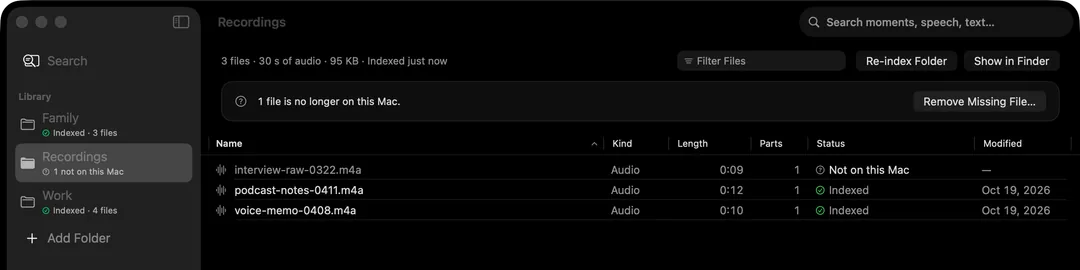
HyperArc lets podcasters search their whole back catalogue, raw recordings included, by topic: “when we talked about burnout”, “the guest's story about the first startup”, “the sponsor read for the mattress company”. It finds the 30-second stretch where that came up, across every file you've added, and opens the recording right there.
Why Your Archive Is Hard to Search
A show with a hundred episodes is a hundred hours of audio, plus the raw tape that never made it out. When a listener asks “which episode was that?” or you want a clip for a highlight reel, you usually end up guessing at episode titles and scrubbing. Transcripts help if you have them for every file and remember the exact words, but raw interviews, pre-interviews and voice memos rarely get transcribed.
Spotlight sees an audio file's name and duration, nothing more. HyperArc listens to the recordings themselves, by indexing what's in each segment.
How It Works
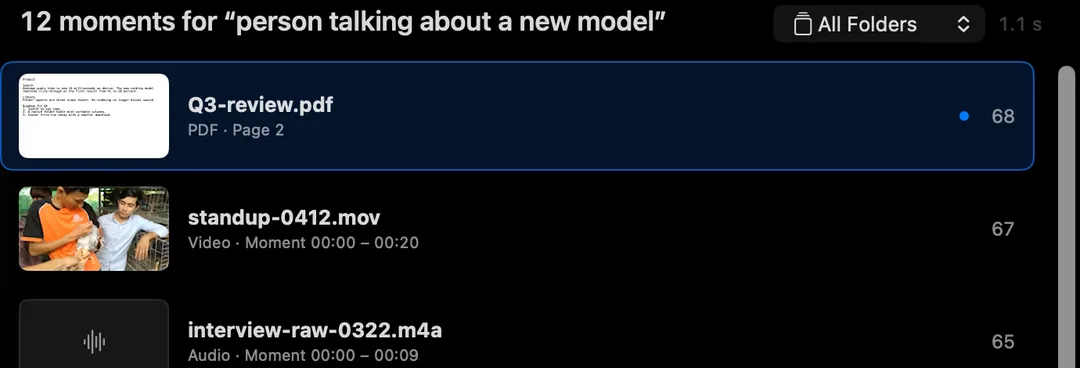
Each audio file is split into 30-second segments. HyperArc's search model, running on your Mac, computes an embedding for each segment, and HyperArc stores the index on your Mac. When you search, your words are embedded the same way and compared against every segment in every recording. The closest matches come back with the file and time range, and Open at [time] starts playback there.
Because the match is by meaning, you can describe the conversation the way you remember it. You don't need the exact words, and text search works across languages, which helps multilingual shows.
How to Search Your Episodes
- Install HyperArc (macOS 15 or later). Setup downloads the search model once, about 485 MB. No account, no API key.
- Add your folders: published episodes, raw multitrack exports, interview tape, voice memos with episode ideas. HyperArc indexes them where they are and watches for new files.
- Let it index in the background. Each folder shows its status, and the folder table lists every recording with its length.
- Describe the moment. “Talking about moving to Lisbon”, “argument about whether remote work is over”, “recommendation for a book on habits”.
- Filter to Audio to hide video, photos and PDFs, or pick one folder, say this season's raw tape.
- Open at the moment and listen. Copy Timestamp grabs the time for your show notes or your editor; Show in Finder takes you to the file.
Good Uses for Podcasters
- Answering “which episode was that?” in a minute instead of an afternoon.
- Building highlight reels and trailers from moments across a season.
- Finding callbacks: the earlier episode where a running joke started.
- Checking what a guest already said on your show before you book them again.
- Digging through raw tape for the bit that got cut but would make a good bonus clip.
What It Is and Isn't
- Topic Search Across EpisodesOne search covers every episode and raw recording in the folders you add.
- Lands on the SegmentResults are 30-second segments with time ranges. Open at [time] plays from there.
- Unreleased Tape Stays PrivateRecordings and searches never leave your Mac. Works offline after setup.
- Not a Transcription ToolNo transcripts, no quoted lines, no speaker identification.
HyperArc gets you to the right half minute. If you then need the exact words in writing, a transcription tool does that part better; the guide to searching audio recordings compares Voice Memos, Notes, MacWhisper and HyperArc honestly. For video podcasts, the same search covers your video files too: see finding a moment in a video.
HyperArc is $129 once, for up to 3 Macs, with a 7-day money-back guarantee.
Updated