HyperArc is a Mac app that searches your videos, audio recordings, photos and PDFs by what's in them, and does it without uploading anything. The search model runs on your Mac. Your file contents, the index it builds and the searches you type never leave the machine, and after a one-time setup download it works offline.
Why This Matters for Media
Searching media by content means something has to look at every frame, listen to every recording and read every page. Many tools do that on a server: you upload the library, or the app streams it to a cloud model. For a lot of people that's a non-starter. Interview recordings with research participants, client footage under NDA, family videos of your kids, scanned medical letters: these are exactly the files you'd want to search, and exactly the files you don't want to send anywhere.
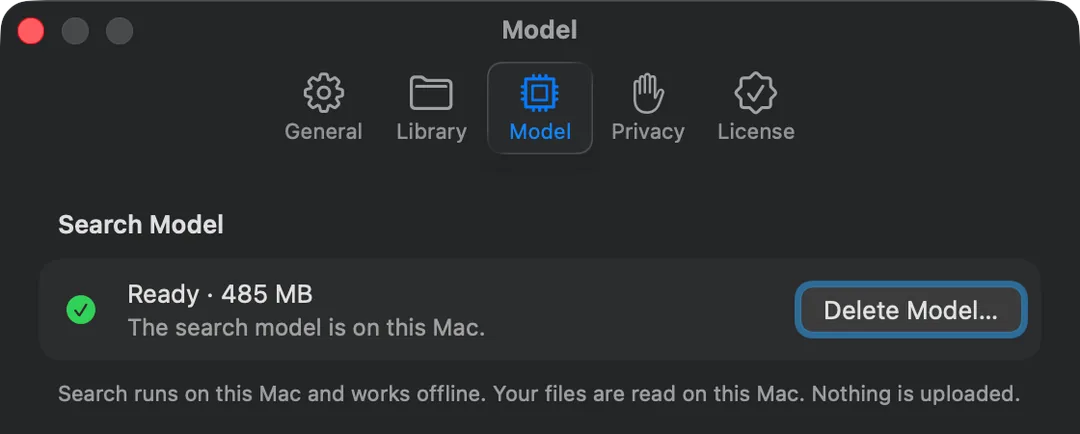
HyperArc does the work locally. During setup it downloads its search model once (about 485 MB). From then on, every 30-second video moment, every audio segment, every PDF page and every photo is turned into an embedding on your Mac, and stored in an index on your Mac. When you search, your text is embedded on your Mac too and compared against that local index.
What Leaves Your Mac, and What Doesn't
Never leaves your Mac:
- The contents of your files: video, audio, images and documents.
- The index HyperArc builds from them.
- Your searches, including images you search with.
The network calls HyperArc does make:
- The model download, once, during setup.
- License activation and checks, so a license works on up to 3 Macs.
- Update checks, to tell you when a new version is out.
- Anonymous usage data: counts and timings only, never file names, file contents or search text. You can turn it off in Settings.
That's the full list. There's no API key to paste in, no account to sign into and nothing billed per search.
How to Set It Up for Offline Use
- Install HyperArc on a Mac running macOS 15 or later, while you're online.
- Download the search model when setup asks (about 485 MB, one time).
- Activate your license. This needs a connection once per Mac.
- Add your folders and let them index. This runs on your Mac and doesn't need the internet.
- Optional: turn off usage data in Settings, under Privacy, if you'd rather send nothing beyond license and update checks.
- Go offline. Search, Find Similar, search with an image and new-file indexing in watched folders all keep working.
You can check the model's status any time in Settings: it shows whether the model is ready and how much space it uses.
Private Does Not Mean Limited
- All Your Media TypesVideos, audio recordings, photos and PDFs, searched together in one window.
- Lands on the MomentResults open the video at the moment, the recording at the segment and the PDF at the page.
- Search With an ImageDrop or paste a photo, clip or PDF to find similar moments, all on your Mac.
- Any LanguageText search works across languages, offline as well as online.
What to Keep in Mind
Offline search covers the folders you've added and indexed. If you add a new folder while offline, it indexes locally like any other. The first index of a large library takes time, since all of it runs on your Mac rather than on a server farm. And HyperArc doesn't sync anything: each Mac keeps its own index of its own folders.
For how this compares with the search built into macOS, which is also local but matches names and words rather than content, see HyperArc vs Spotlight. The privacy policy has the formal details.
HyperArc is a one-time $129, works on up to 3 Macs, and comes with a 7-day money-back guarantee.
Updated